Features
A complete project management suite, all in one place.
EverGantt brings the essential parts of project management together: project planning, task and sprint management, progress tracking, team capacity, calendars and shared project notes. Plan the work, coordinate the people doing it, and keep every project moving with one connected set of tools.
| Project tool | What it helps you do | Plan |
|---|---|---|
| Project planning Build timelines, organize tasks and manage dependencies with Gantt charts. | Build timelines, organize tasks and manage dependencies with Gantt charts. | Free |
| Task and sprint management Run day-to-day work with Kanban, Scrum, sprints or a flexible task list. | Run day-to-day work with Kanban, Scrum, sprints or a flexible task list. | Free |
| Project dashboards Track progress, spot overdue work and see project health. | Track progress, spot overdue work and see project health. | Free |
| Team calendar Coordinate deadlines, tasks and events in one shared view. | Coordinate deadlines, tasks and events in one shared view. | Free |
| Team capacity Balance workloads and see who has room for more work. | Balance workloads and see who has room for more work. | Free |
| Shared project notes Keep briefs, meeting notes and decisions with the project. | Keep briefs, meeting notes and decisions with the project. | Pro |
| Mobile access Check projects and manage tasks from a phone-friendly layout. | Check projects and manage tasks from a phone-friendly layout. | Free |
| Team collaboration Share projects and keep everyone working from the same plan. | Share projects and keep everyone working from the same plan. | Team & Business |
| Export and project files Share charts, export project data and start from templates. | Share charts, export project data and start from templates. | Free |
| Everyday tools Work comfortably with dark mode, undo and keyboard shortcuts. | Work comfortably with dark mode, undo and keyboard shortcuts. | Free |
Project planning with Gantt charts
Build timelines, organize tasks and manage dependencies with Gantt charts.
Turn a project plan into a clear, workable schedule. Organize work into stories and tasks, set dates, and connect tasks that depend on one another. When plans change, move a bar or adjust its length. EverGantt shows how a date change affects the work that follows, helping you understand the impact before it catches the team by surprise.
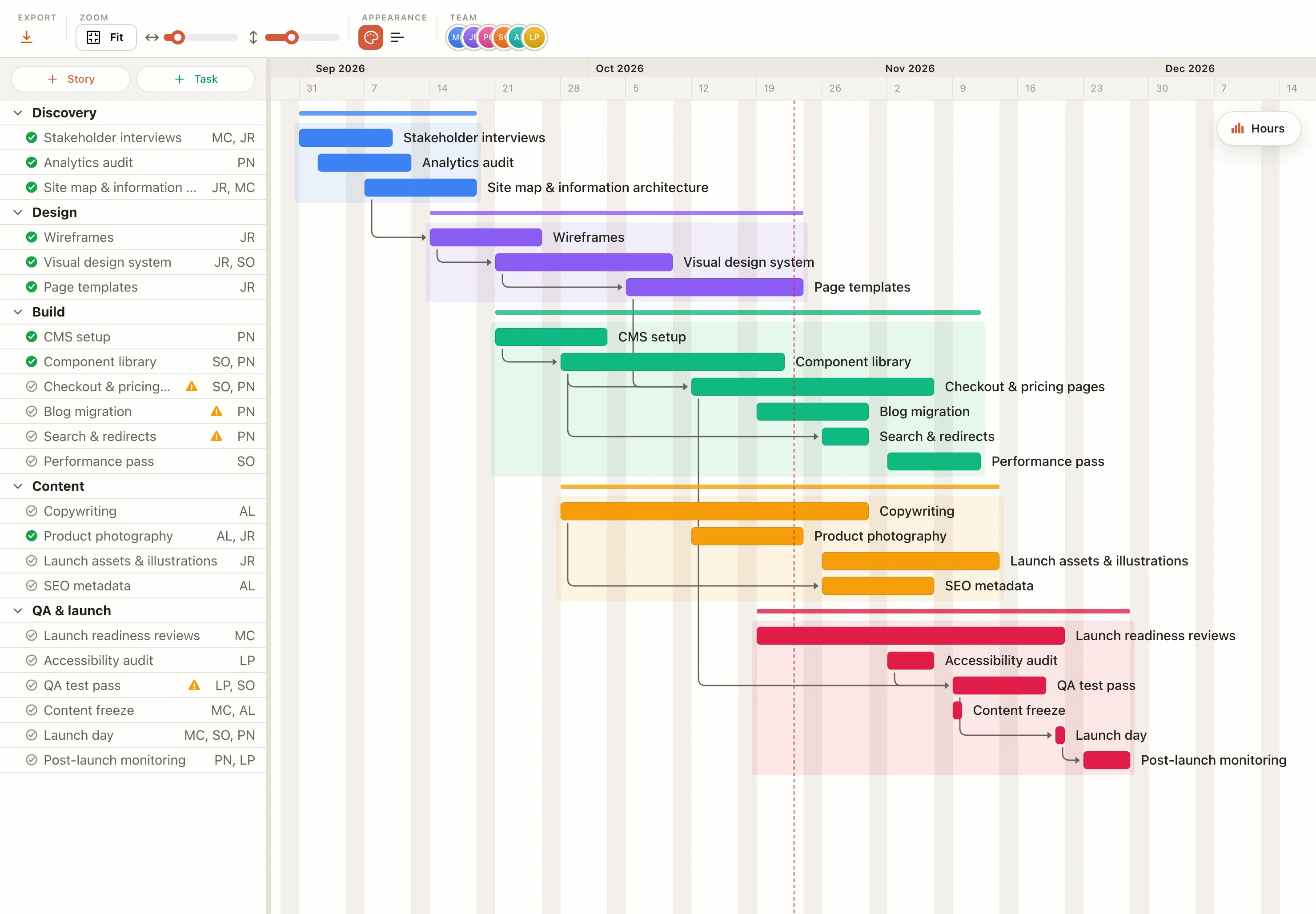
- Organize tasks into stories and see each task on the timeline
- Drag bars to reschedule work, adjust task duration or reorder rows
- Connect dependent tasks with Depends on and see the sequence in the chart
- When a task is delayed, its dependent tasks move with it
- Assign several people to a task and track each person’s hours
- Add task notes and colors, and mark work complete as it gets done
- Zoom in on dates or rows, or choose Fit to see the whole project
- Customize the chart with weekend visibility, a today line, bar labels, colors and text size
- Select multiple tasks to change their colors together
Task and sprint management
Run day-to-day work with Kanban, Scrum, sprints or a flexible task list.
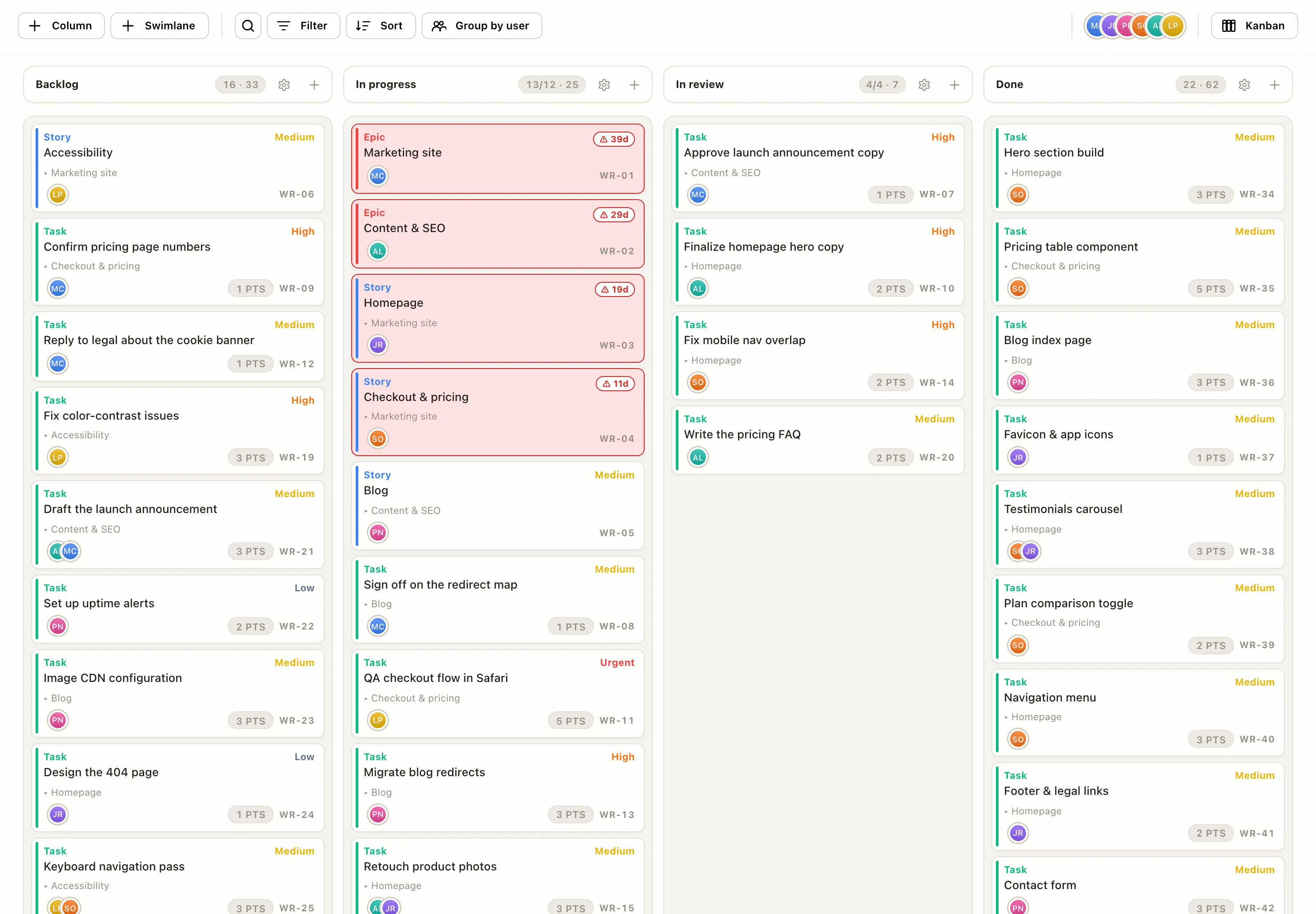
Project plans only work when the day-to-day tasks keep moving. EverGantt gives your team different ways to manage that work: use Kanban to track flow, Scrum to plan and run sprints, or Task Tracker for a straightforward list. Switch modes without losing your cards, and keep the work connected to the wider project.
Kanban
- Create your own columns and move cards through the workflow
- Set minimum and maximum Work-in-progress limits for each column
- Flag cards that have been sitting too long with Age warning (days)
- Organize work with swimlanes or Group by user
- Track effort in hours
Scrum
- Plan sprints from a product backlog
- Give each sprint a goal and dates, then select Start sprint
- Send unfinished cards back to the backlog when you complete a sprint
- Review past sprints and velocity in Completed sprints
- Track effort in points
Cards
- Organize work as Epics, Stories or Tasks, and link items to a parent
- Set priorities: Urgent, High, Medium or Low
- Add assignees, points or hours, notes and a card code such as WR-14
- Schedule cards to repeat
- Filter by type, priority, due date or assignee; sort tasks and search cards
Task Tracker
- Build a simple task list with custom text, number, date or select columns
- Add a due date to each task
- Group tasks by group or assignee
Free Repeating cards need Pro.
Project dashboards and progress tracking
Track progress, spot overdue work and see project health.
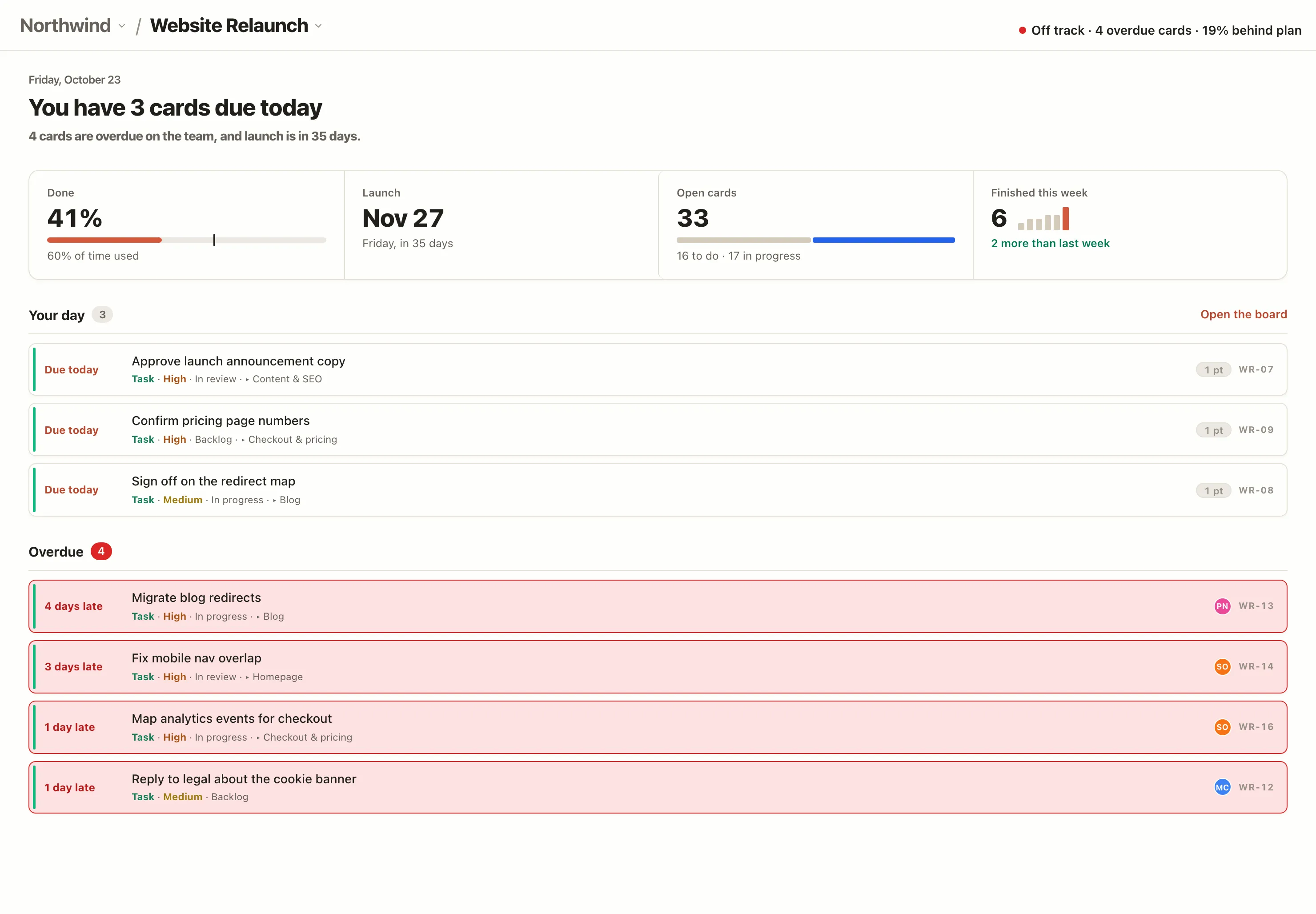
Keep an eye on how work is progressing without digging through individual tasks. Project dashboards bring completion, deadlines and outstanding work together. The All projects overview gives you a broader view across your portfolio, helping you spot which projects need attention first.
Project dashboard
- See completion, launch date, open tasks or cards, and work completed this week
- Your day highlights cards due today
- Overdue shows late work and how many days it is overdue
All projects
- See every project ranked by health: red, amber or green
- Review open and completed cards across projects
- On a team overview, see team load and who is over capacity
Free The All projects overviews need Pro. Team load is on Team and Business.
Project and team calendar
Coordinate deadlines, tasks and events in one shared view.
Keep project dates and team commitments in view together. Add calendar tasks and events, then show Gantt and board items alongside them. Important dates stay visible even when they were created in another part of the project.
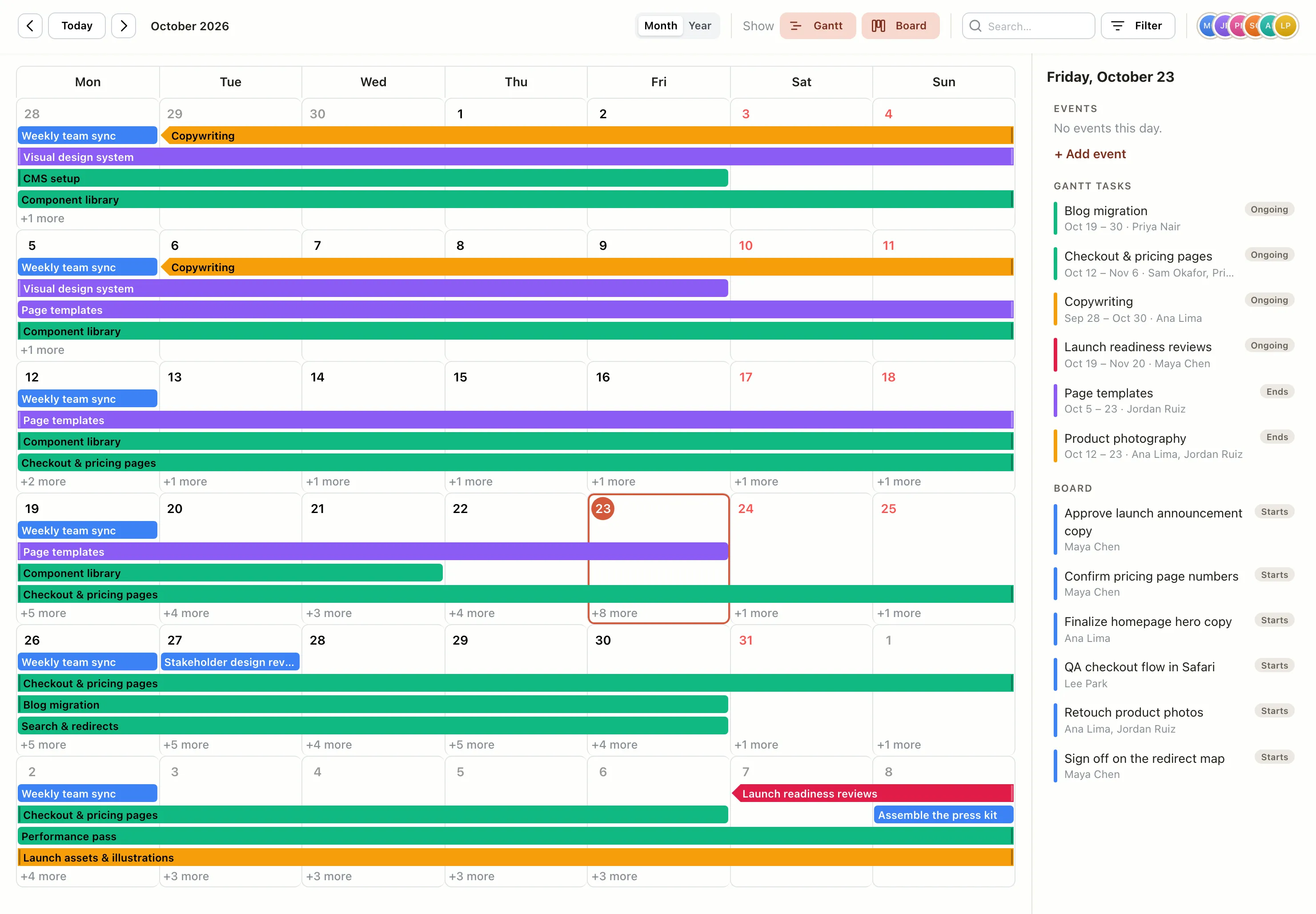
- Switch between Month and Year views, or jump to today
- See Gantt and Board items alongside calendar tasks and events
- Drag a calendar task to reschedule it
- Set tasks and events to repeat daily, weekly, monthly or yearly
- Filter by assignee and search the calendar
- Use automatic assignee colors to see who each item belongs to
Team capacity and workload planning
Balance workloads and see who has room for more work.
A realistic project plan accounts for people’s time, not just task dates. EverGantt compares planned Gantt hours with each person’s weekly capacity, making it easier to spot overload and rebalance work. Set a capacity for each teammate and see where the hours are going.
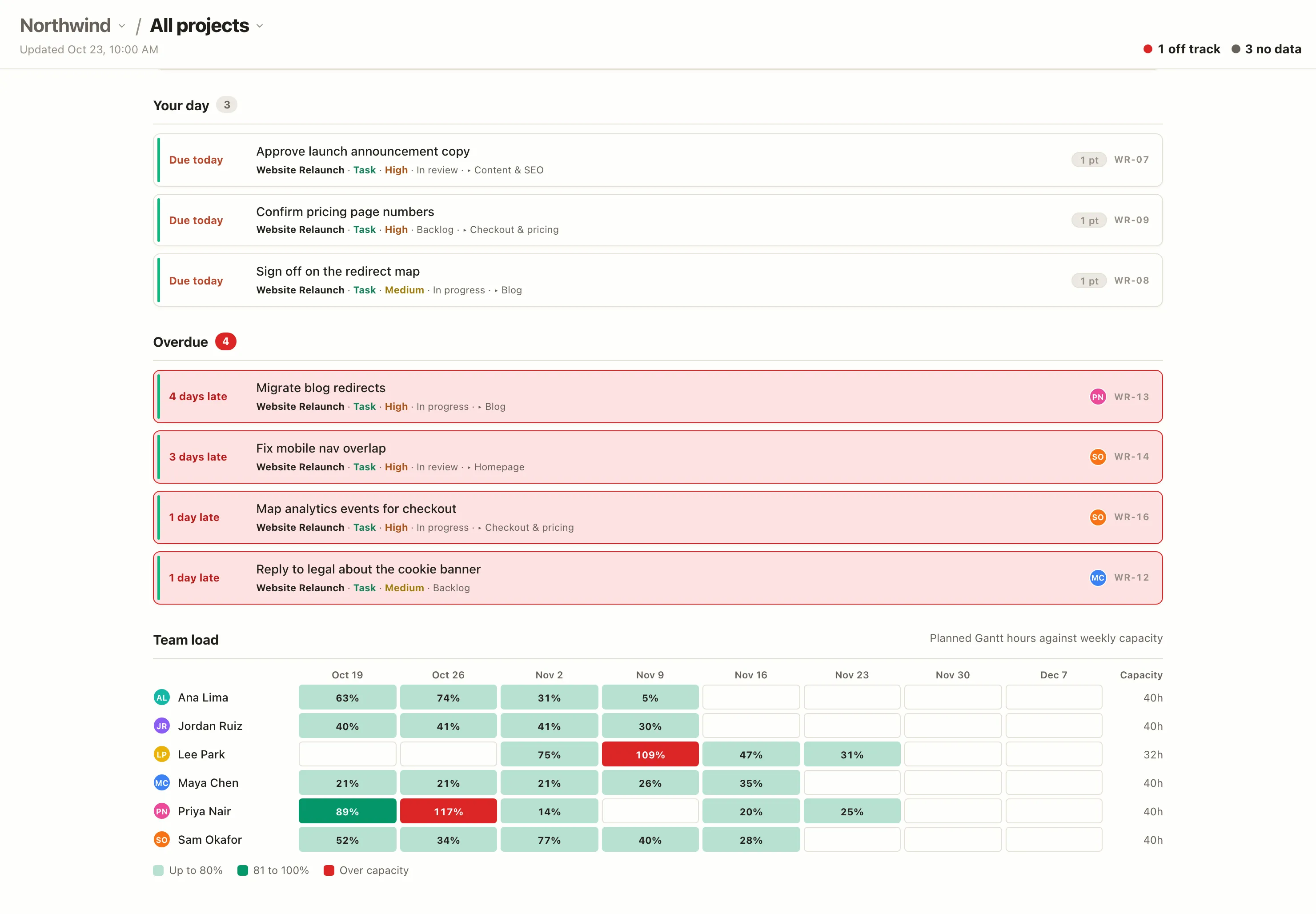
- Open Team Utilization from the Gantt’s Hours button to see each person’s hours, week by week
- Set a weekly hour cap for each person and, optionally, a Project cap h/wk
- Get over-capacity warnings when someone is booked beyond their limit; turn them off with Over-utilization warnings
- Keep a team roster with each person’s name, email and role
- On a team overview, compare planned Gantt hours with weekly capacity across projects
Free Team load across projects is on Team and Business.
Shared project notes and documentation
Keep briefs, meeting notes and decisions with the project.
Keep the context behind the work close to the work itself. Use shared notes for project briefs, meeting notes, decisions and launch plans. Everyone on the project can find the same information without hunting through separate documents.
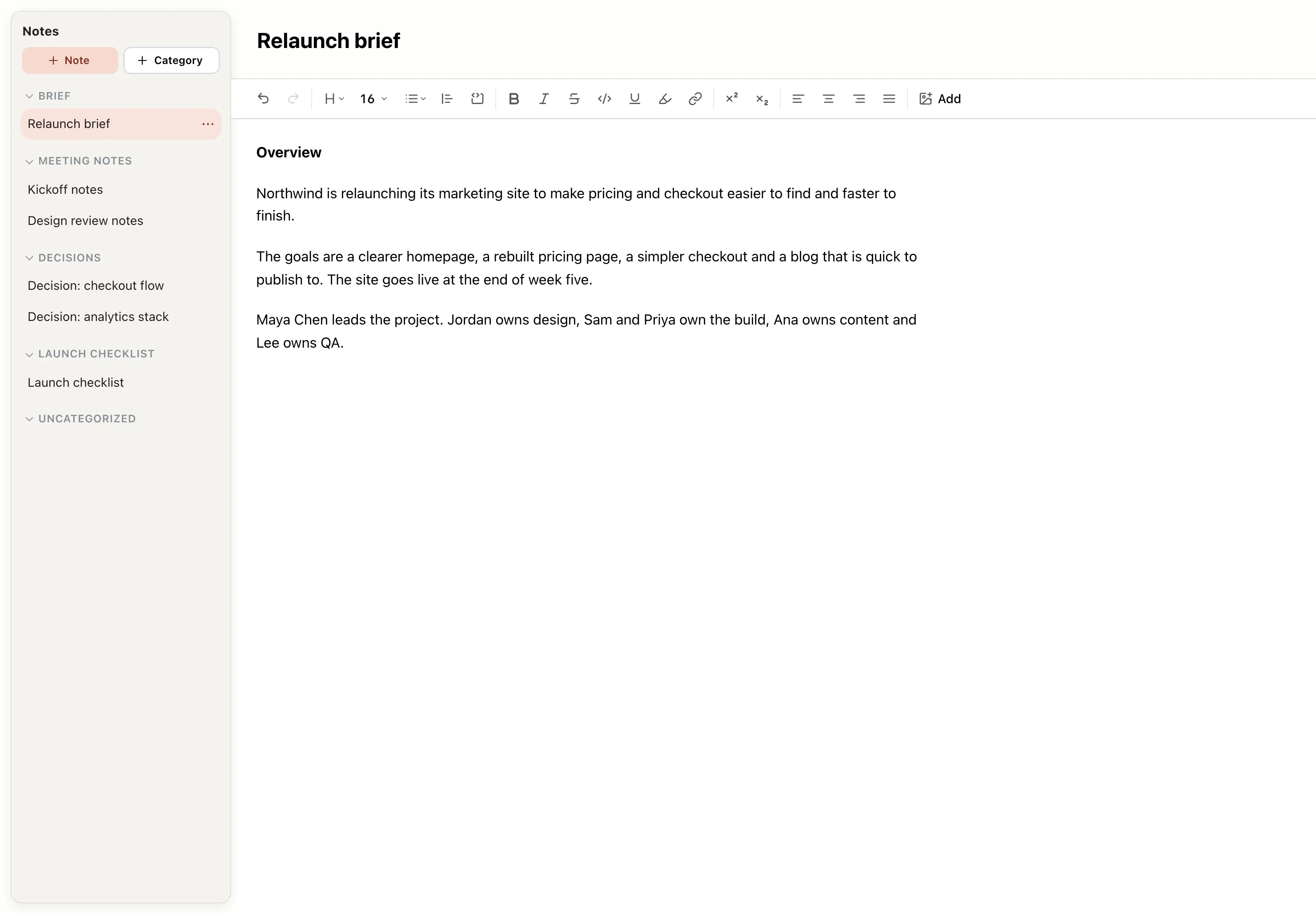
- Format notes with headings, alignment, highlights, links and task lists
- Add images by dragging or pasting them into a note
- Organize notes into categories and move them between categories
- Create a note directly inside a category
- Notes are saved with the project
On your phone
Check projects and manage tasks from a phone-friendly layout.
Your projects go with you. EverGantt adapts to a phone-sized screen with its own navigation, so you can check what’s due, review the plan or move a card while you’re away from your desk.
- Move between Gantt, Tasks, Today, Calendar and More
- Use Today to see what’s due and what’s late
- Access the same account and projects as on desktop
- Switch to the desktop layout when you need the full view
Free Today, and opening the same projects on every device, need Pro.
Team collaboration and shared projects
Share projects and keep everyone working from the same plan.
Project work is a team effort. Create a team, invite people by email and share projects with the people who need them. Everyone works from the same current plan, with access levels that help you decide who can make changes.
- Create a team and invite people by email
- Share team projects and organize them into categories
- Switch between your personal workspace and a team workspace
- Give people a View only role when they need access without editing
- Get in-app notifications when work is assigned to you or a reminder is due
- Search, duplicate and organize projects
Exports, project files and templates
Share charts, export project data and start from templates.
Make your project information useful beyond the app. Export a chart as an image, create a PDF for printing, or export the underlying data to a spreadsheet. Save a project file to open again later, or get started with a template.
- Export to PNG, PDF, SVG or CSV
- Choose Standard or Pretty style, and customize the size, title and dependency lines
- Export just the chart when you don’t need the task list
- Use Export project to save a project file, then Import project to open it again
- Save projects to the cloud and open them from any browser
- Start with a template from evergantt.com, with dates shifted to start next Monday
Free Cloud save and Import project need Pro.
Everyday details
Work comfortably with dark mode, undo and keyboard shortcuts.
The small conveniences matter, too. Choose the look that suits you, undo a change if you make a mistake, and use familiar keyboard shortcuts to keep moving.
- Choose light or dark mode
- Undo and redo up to 50 steps
- Use keyboard shortcuts: Cmd/Ctrl+S to save, Cmd/Ctrl+O to open, Cmd/Ctrl+Z to undo, Shift+Cmd+Z or Cmd+Y to redo, and Delete to remove the selection
- On the free plan, your chart stays in your browser, so refreshing the page won’t erase it
What EverGantt doesn’t do
EverGantt is a project management suite focused on planning, organizing and coordinating work. It brings core project tools together, but it isn’t trying to replace every system your business uses.
- No AI-generated plans or automatic date guesses. You stay in control of the schedule.
- It isn’t a CRM, so it doesn’t manage leads, deals or customer contacts.
- It doesn’t create client quotes.
- It doesn’t send messages to customers or stakeholders. You can keep using your existing channels for external updates.
Manage your next project with EverGantt
Bring your planning, tasks, progress and team coordination into one place. Start with a real project and explore how the tools work together. Building, editing and exporting are free, and you can get started without an account.