Project management tools with mobile apps (2026 check)
Published October 24, 2026
Short answer: Almost every project management tool has a phone app, but they split hard on one question: can you see your timeline on it? As of October 2026, Wrike and Asana show a Gantt or timeline view on a phone, and TeamGantt’s newest app listing says it does too. Trello, ClickUp, and Microsoft Planner’s Premium plans don’t, and Jira appears to be removing its mobile timeline. We found no vendor documentation describing dragging timeline bars on a phone. If checking dates on the go matters to you, test that one view before anything else.
A phone app matters because that’s where people already are
In September 2026, phones made up 58.99% of worldwide web traffic, according to Statcounter Global Stats. In 2026, Pew Research Center found that 91% of US adults own a smartphone. Those numbers cover the whole web, not just work, but the habit carries over: sooner or later, someone on your team opens the plan on a phone.
The catch is that the phone is a bad place for a lot of project work. In a vendor survey of 1,000 US full-time employees, Adobe found that 62% say the small screen makes work harder. That’s why a good mobile app picks the few jobs that matter on a phone and does those well, instead of shrinking the desktop. From building EverGantt’s own phone layout, our short list of those jobs is:
- What’s happening now, and what’s due today?
- Can I move this task a day, or mark it done?
- What changed since I last looked?
Anything beyond that usually waits for a laptop.
What should a project management mobile app let you do?
A useful mobile app answers the “now” questions fast and lets you make small edits without fighting the screen. When you test one, check these six things in order:
- The views you actually use. List and board are nearly universal on phones. Calendar is common. Timeline or Gantt is where tools split.
- View versus edit. Can you only look at the timeline, or can you change dates from it?
- Free-plan access. The app is usually free, but the views you need may sit behind a paid plan.
- Offline behavior. What happens in a basement, on a site visit, or on a plane?
- Sync. A change on the phone should land on the shared plan right away, not in a separate copy.
- Thumb-friendly editing. Big targets, sheets instead of tiny menus, and an undo.
The rest of this guide goes tool by tool against those checks, using each vendor’s help center, pricing page, and app store listing as of October 24, 2026. A few help centers blocked automated reading, so we note where a claim rests on search results instead. (For the desk side of the same choice, see the easiest project management software.)
Which tools show a Gantt chart or timeline on a phone?
The timeline is the view most tools make you pay for, and it’s also the one most likely to be missing on a phone. Here’s what each vendor says, as of October 24, 2026:
| Tool | Timeline or Gantt on a phone | Offline on mobile | Apple App Store rating* |
|---|---|---|---|
| Wrike | Yes, documented on Android and iOS | Partial | 4.64 |
| Asana | Yes, per its App Store listing | Not verified | 4.66 |
| TeamGantt | Listing says yes (v3.0, Oct 22); help docs say list only | Not verified | too few ratings |
| Smartsheet | Gantt listed for reports only | Forms only | 4.85 |
| monday.com | Gantt is browser-only, per its help center | Limited | 4.83 |
| Jira Cloud | Reportedly being removed (community post, ~Apr 2026) | Not verified | 4.71 |
| Trello | No, “no longer accessible on mobile” | Limited | 4.34 |
| ClickUp | No, “not planned or on our roadmap” | Limited | 4.68 |
| Microsoft Planner | No for Premium timelines | Not verified | 4.63 |
| Notion | Not verified | Yes, all plans | 4.78 |
| Basecamp | No Gantt in the product | No | 4.68 |
| GanttPRO | Not described in its app | Not verified | too few ratings |
| EverGantt | Yes, as a list you can edit | No | No native app yet |
*Apple App Store average, read October 24, 2026.
What’s missing is editing. We found no vendor documentation describing dragging timeline bars on a phone, though a few help centers blocked us and TeamGantt’s new listing does say “view and edit.” A few tools have the view, but the editing mostly isn’t documented.
The tools, one by one
Asana. Native apps on iOS and Android. Its own App Store listing says you can “choose timeline view for projects to see a Gantt chart with task dependencies,” alongside list, board, and calendar. We couldn’t find a help article on editing the timeline from a phone. Timeline itself starts on Asana’s paid Starter plan.
monday.com. Native apps, included on the free plan. According to its help center (which we could only read through search results), the Gantt view is browser-only, while table, calendar, kanban, and timeline views work on mobile, and mobile board views need a paid account. Timeline, Gantt, and Calendar views start at the Standard plan.
Trello. Native apps, included on the free plan. Atlassian’s support page says Trello’s Timeline view “is no longer accessible on mobile devices.” Calendar, Timeline, and Table views are Premium features. On mobile, Trello’s Planner shows cards with due dates on a calendar.
ClickUp. Native apps, on every plan according to its help center. ClickUp’s mobile app doesn’t include the Gantt view, and its feedback board update from October 31, 2025 says Gantt on mobile is “not planned or on our roadmap.”
Notion. Native apps and an offline mode on all plans, including free, though a downloaded database keeps only its first 50 rows. Its help center doesn’t say whether timeline views work on a phone.
Jira Cloud. Atlassian’s iPhone and Android docs still describe a mobile timeline, mostly for creating epics. An Atlassian Community post from around April 2026, titled “Changes coming to Timeline views in Jira’s mobile app,” reportedly says the timeline is being removed from the mobile app over the following months.
Microsoft Planner and Project. Planner’s apps need a work or school Microsoft 365 account. Microsoft Learn says Premium plans, which hold the timeline (Gantt) view, ask phone users to open them in Project for the web. Microsoft Project’s desktop app has no phone app, according to a Microsoft MVP on Microsoft Q&A.
Smartsheet. Native apps with very high App Store ratings. On a phone, sheets open in mobile, grid, card, and list views, while Gantt is listed for reports only. Its offline support covers forms only.
Wrike. The clearest yes. Wrike’s Android feature list, updated October 2026, includes the Gantt chart, and Wrike has shown the Gantt on iPhone and iPad since 2020. Offline covers items you opened while online. One catch: the Gantt chart isn’t on Wrike’s Free plan.
Basecamp. Native apps with the same features as the browser, by Basecamp’s own account. There’s no Gantt view in the product at all, and its help page says the apps need a connection.
TeamGantt. Its App Store listing for version 3.0, released October 22, 2026, promises a “viewable Gantt chart” and says “view and edit your gantt chart timeline.” TeamGantt’s help articles still describe a list-only app, so treat this as new and unconfirmed until you try it. The app is free with any plan, including the free Personal plan.
GanttPRO. A native app for task lists, dates, statuses, time logs, and notifications. Its App Store description doesn’t describe a Gantt view on the phone. There’s no free plan, just a 14-day trial.
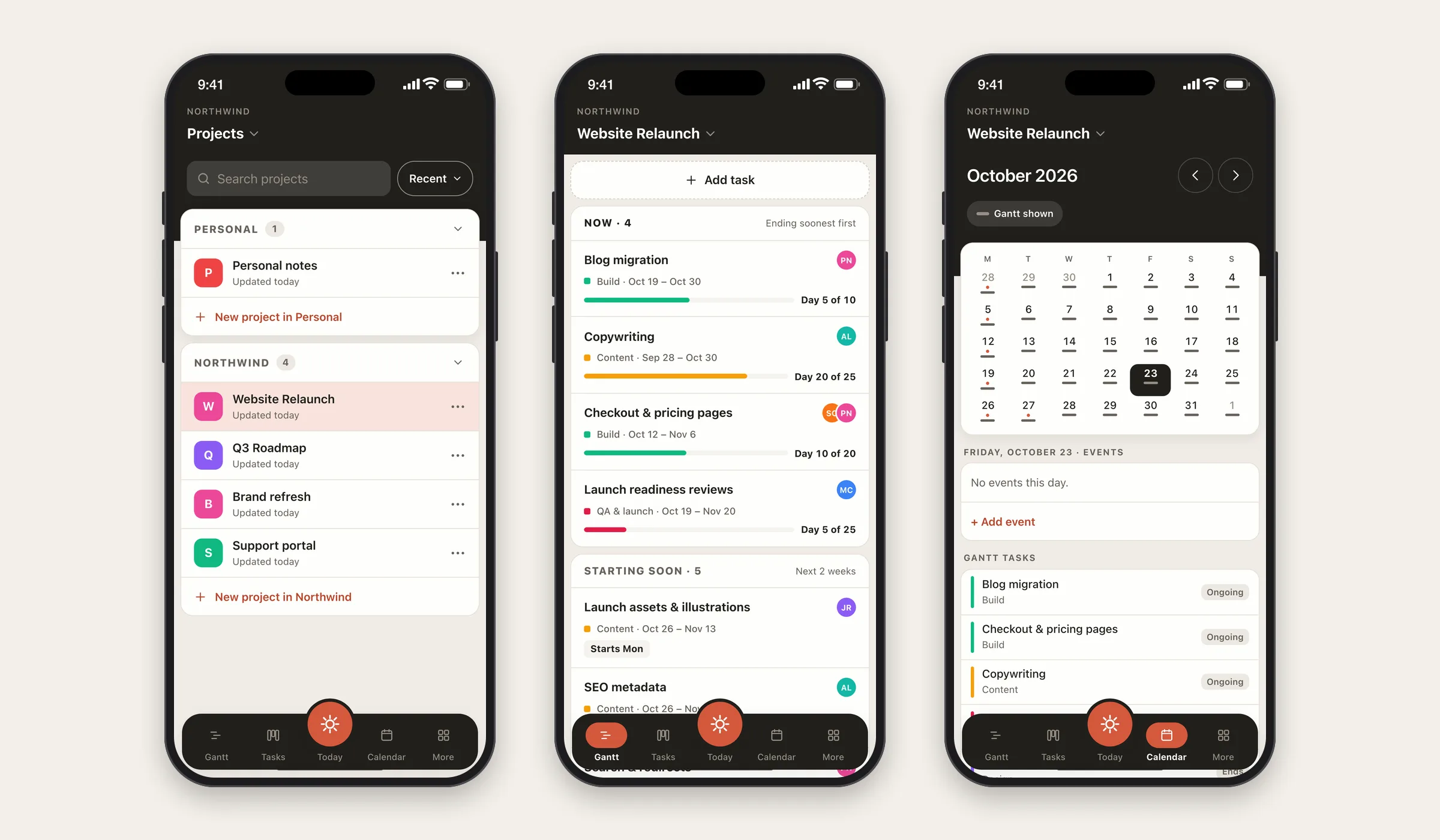
EverGantt. Our own, so judge accordingly. I built its phone layout. There’s no native app yet; it runs in your phone’s browser. On a phone, your Gantt shows as a list grouped into Now, Starting soon, Later, and Done, and you edit a task’s dates, people, predecessors, and notes in a sheet. There’s no offline mode. Building and editing a chart is free in your browser, with no account. Here’s how it works.
Should you show a Gantt chart on a phone at all?
Maybe not as bars. A Gantt chart earns its keep by showing many tasks across weeks at once, with arrows between them. A phone screen is about 390 pixels wide. Fit eight weeks into that and each day is a sliver, labels get cut off, and dependency arrows turn into a tangle.
That’s why the tools that do show a Gantt on mobile treat it as something to look at, not work in. It’s also why we went another way. On a phone, EverGantt turns the timeline into a list that leads with what’s running now, and keeps dates one tap away. You lose the at-a-glance picture of the whole project and gain something you can read and change with a thumb.
It depends on your phone work. If your phone work is “glance at the whole schedule,” a viewable Gantt is worth having. If it’s “move Thursday’s task to Friday,” a list with a good edit sheet is faster. The full timeline still belongs on the bigger screen, where a Gantt chart does its real job.
Does your team need offline access?
Most tools here ship native apps from the App Store and Google Play, and native apps usually win on two things: working offline and push notifications. EverGantt doesn’t have a native app yet. It runs in your phone’s browser and needs a connection.
With signal, the gap is small for checking and updating a plan. Offline is where it shows. If your team regularly works without signal, on job sites or in transit, put offline support at the top of your checklist and test it before you commit: open a few items, switch on airplane mode, and see what still works. Notifications are the other gap. If people need a ping on their phone when a card lands on them, check which tools actually send one. A real-time view only helps if it’s there when you look.
How to choose a project management tool for your phone
Start from your phone moments instead of the feature grid. Before you sign up anywhere, write down the three things you actually do on a phone each week. Then test only those, in each tool’s free plan or trial:
- Open the view you’d use most, whether that’s today’s tasks, the board, or the timeline, and time how long it takes to find something.
- Make your most common edit, like moving a date, ticking a task, or reassigning someone.
- Turn on airplane mode and repeat both, if you ever work without signal.
- Check the plan page to see whether those views are on the plan you’d actually buy.
Most small teams find one tool clearly wins on their three moments. And if no tool fits your phone habits, that’s a sign to keep the phone for checking and do the planning at a desk. That’s a fine setup, and it’s how most projects run anyway. For where small teams usually land, see the 80% case.
Want to see how a phone-first approach to a Gantt plan feels? Open app.evergantt.com on your phone. Building a chart is free, no account needed.
Sources (all retrieved October 24, 2026): Statcounter Global Stats, Desktop vs Mobile vs Tablet Market Share Worldwide · Pew Research Center, Americans’ Use of Mobile Devices in 2026 · Adobe Acrobat, Sent from my iPhone: How mobile phones infiltrated the American work week (vendor survey) · Asana, App Store listing and pricing · monday.com, Mobile app board views and pricing · Atlassian, Timeline view (Trello) and Trello Planner on mobile · Trello, pricing · ClickUp, Gantt view on mobile (feedback board) · Notion, Working offline in Notion · Atlassian, Use Jira Cloud for iPhone, Jira Cloud on Android, and Changes coming to Timeline views in Jira’s mobile app · Microsoft Learn, Plan Conversion (Planner) · Microsoft Q&A, Viewing a Project schedule on Android · Smartsheet, Mobile sheet and report controls and offline forms · Wrike, Available features for Android and Gantt Chart in Wrike · Basecamp, Basecamp on Mobile · TeamGantt, App Store listing and pricing · GanttPRO, App Store listing and pricing.
Keep reading: Gantt chart mobile app: EverGantt now works on your phone · Project management software with nothing to download · What’s the easiest project management software to use?
Frequently asked questions
Which project management apps show a Gantt chart on a phone?
As of October 2026, Wrike documents a Gantt chart in its Android and iOS apps, and Asana's App Store listing says its timeline view shows a Gantt chart. TeamGantt's new October 2026 listing says it added one too. Trello, ClickUp, and Microsoft Planner's Premium timeline don't show one on a phone.
Can you edit a Gantt chart from a phone?
Rarely, as far as we can tell. In our October 2026 check, we found no vendor documentation describing dragging timeline bars on a phone. TeamGantt's App Store listing says view and edit. EverGantt takes a different route: on a phone your plan is a list, and you change a task's dates in a sheet instead of dragging bars.
Do project management apps work offline?
Some, partly. Notion offers offline on all plans, including free, with limits. Wrike caches items you opened while online. monday.com and ClickUp offer limited offline modes. Smartsheet's offline support covers forms only, and Basecamp needs a connection. Check the specific actions you need before relying on offline use.
Are project management mobile apps free?
The apps themselves usually are, but the useful views often aren't. Trello's free plan includes its apps, while its timeline and calendar views are Premium features. Wrike's app is free, but its Gantt chart isn't on the Free plan. EverGantt lets you build and edit a chart in your phone's browser for free, with no account.