
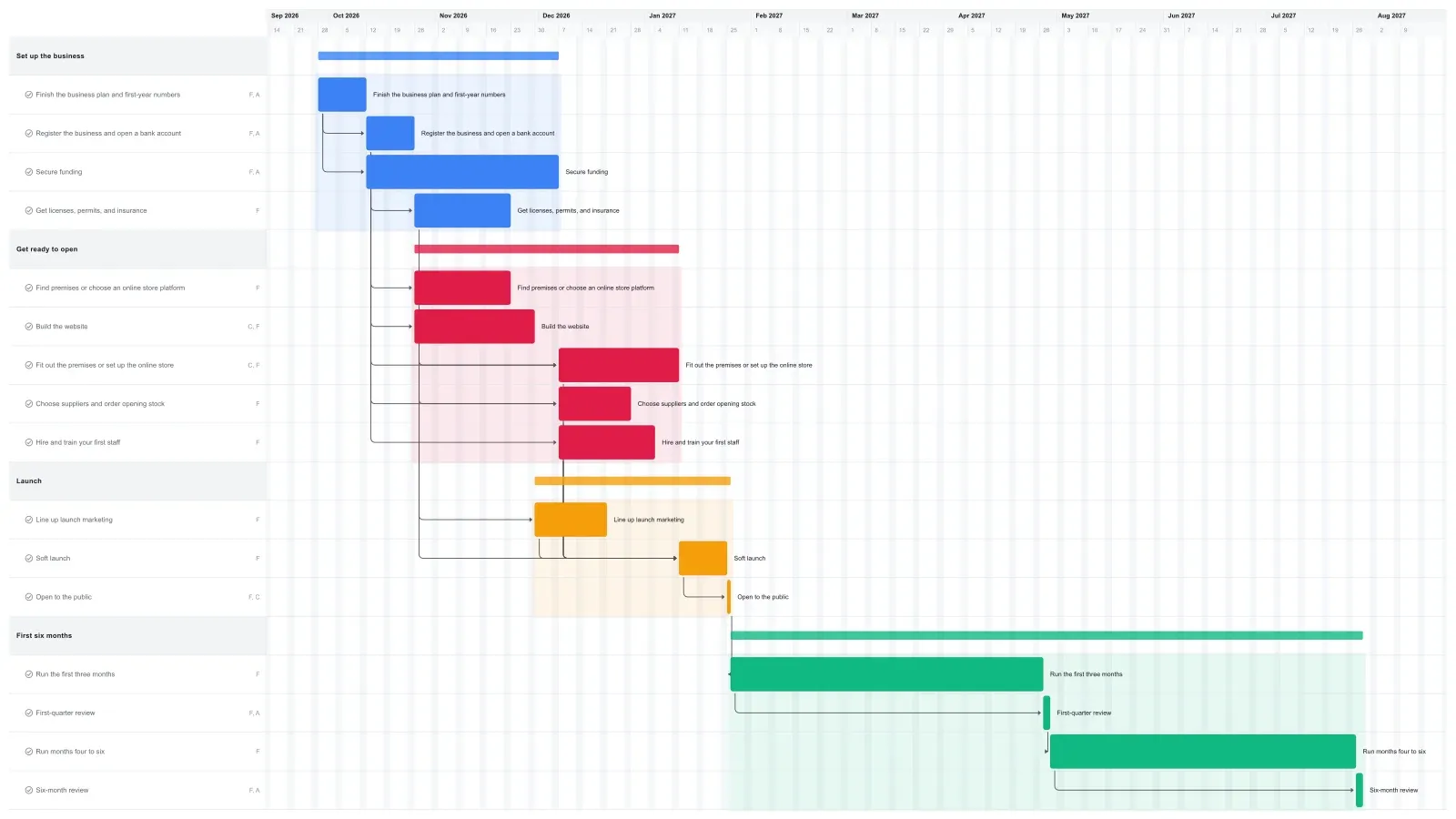
What a realistic business plan timeline looks like
A Gantt chart for a business plan often covers the first year, and this one runs about ten months: roughly four months to get ready, opening day in week 18, then six months of trading with a review at three months and another at six. It's the timeline or milestones section of your plan, the page a lender, investor, grant panel, or instructor reads to see that you've thought about the order of things.
Funding decides the opening date. Finishing the plan takes two weeks, funding gets eight, fitting out the premises or setting up the online store takes five more, and a two-week soft launch comes before opening day. Loan timing varies by lender and by loan type, so set that bar to the dates your lender actually gives you.
The rest runs alongside. Registration, licenses and insurance, the website, launch marketing, suppliers, and first hires all finish before the fit-out does, which leaves at least a week of room if one of them runs long.
How to adapt the timeline and put it in your plan
Drag the first task to the week you start; if that's later, every linked task moves with it. Change what doesn't fit your business, then export the chart and paste it into your plan.
Links only push tasks later, so shortening a bar leaves a gap to close by hand. If you're funding the business yourself, shorten the funding bar to the time it takes to move the money, then Cmd-click (Ctrl-click on Windows) every task after it and drag them back together. The fit-out still waits for the premises search, so this gains up to two weeks. If it's just you, delete the hiring task.
To add it to your plan, click Export, pick PDF or PNG, and tick "Chart only" if the page is narrow. For a plan this long, A3 landscape usually reads better than A4. PNG drops into Word or Google Docs, and PDF works as an appendix. See how to export a Gantt chart for the options.
Make it yours
Drag the first task to your real start date and everything linked to it moves along. Rename the roles to your people, then export a PNG, PDF, or SVG when you need to share it. No template fits? Start from a blank plan with the project schedule maker. Saving to the cloud starts at Pro; sharing with teammates is on Team and Business.