
EverGantt

Gantt chart template

Product Launch Template

This product launch Gantt chart takes a small software team from launch goals to retro in about 12 weeks: positioning, pricing, a private beta, feature freeze, QA, docs, the landing page, launch assets, press outreach, launch day, and two weeks of follow-up. Every task is linked to the one it waits on, so when QA runs a week long, you see the new launch date that day. Open it in your browser with no account needed and set the dates to your launch.

26 tasks · 5 phases · about 3 months

BusinessSoftware & web

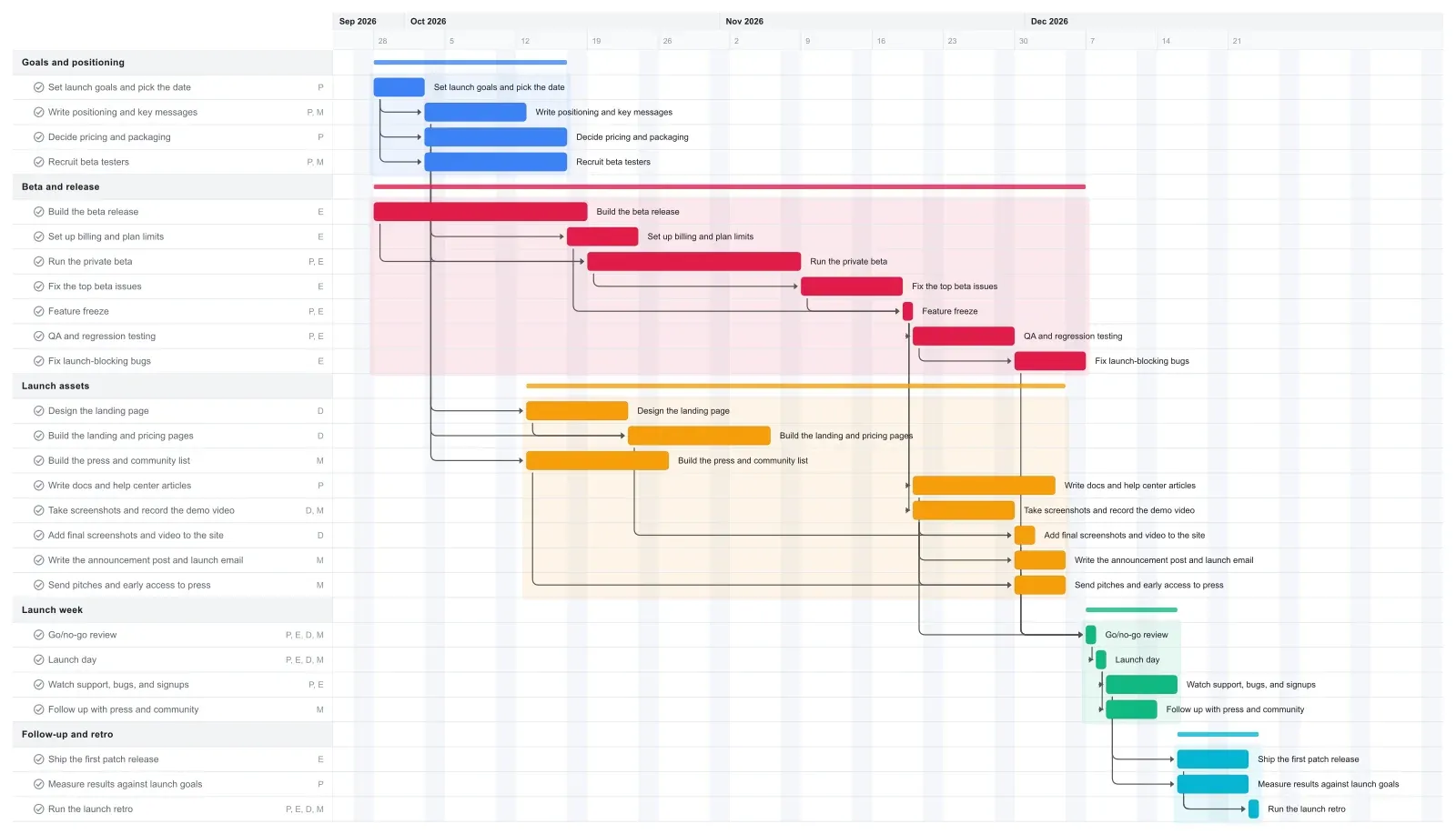
Product Launch Gantt chart template in EverGantt, light theme

What's in this template

PhaseTaskLengthDepends onWho
Goals and positioning Set launch goals and pick the date 5 days - PM
Goals and positioning Write positioning and key messages 10 days Set launch goals and pick the date PM, Marketing
Goals and positioning Decide pricing and packaging 2 weeks Set launch goals and pick the date PM
Goals and positioning Recruit beta testers 2 weeks Set launch goals and pick the date PM, Marketing
Beta and release Build the beta release 3 weeks - Engineering
Beta and release Set up billing and plan limits 7 days Decide pricing and packaging Engineering
Beta and release Run the private beta 3 weeks Build the beta release, Recruit beta testers PM, Engineering
Beta and release Fix the top beta issues 10 days Run the private beta Engineering
Beta and release Feature freeze 1 day Fix the top beta issues, Set up billing and plan limits PM, Engineering
Beta and release QA and regression testing 10 days Feature freeze PM, Engineering
Beta and release Fix launch-blocking bugs 7 days QA and regression testing Engineering
Launch assets Design the landing page 10 days Write positioning and key messages Design
Launch assets Build the landing and pricing pages 2 weeks Design the landing page, Decide pricing and packaging Design
Launch assets Build the press and community list 2 weeks Write positioning and key messages Marketing
Launch assets Write docs and help center articles 2 weeks Feature freeze PM
Launch assets Take screenshots and record the demo video 10 days Feature freeze Design, Marketing
Launch assets Add final screenshots and video to the site 2 days Take screenshots and record the demo video, Build the landing and pricing pages Design
Launch assets Write the announcement post and launch email 5 days Take screenshots and record the demo video Marketing
Launch assets Send pitches and early access to press 5 days Build the press and community list, Take screenshots and record the demo video Marketing
Launch week Go/no-go review 1 day Fix launch-blocking bugs, Write docs and help center articles, Add final screenshots and video to the site, Write the announcement post and launch email, Send pitches and early access to press PM, Engineering, Design, Marketing
Launch week Launch day 1 day Go/no-go review PM, Engineering, Design, Marketing
Launch week Watch support, bugs, and signups 7 days Launch day PM, Engineering
Launch week Follow up with press and community 5 days Launch day Marketing
Follow-up and retro Ship the first patch release 7 days Watch support, bugs, and signups Engineering
Follow-up and retro Measure results against launch goals 7 days Watch support, bugs, and signups PM
Follow-up and retro Run the launch retro 1 day Ship the first patch release, Measure results against launch goals PM, Engineering, Design, Marketing

What a realistic product launch timeline looks like

A small team launching a new software product usually needs two to three months from launch goals to launch day; a feature launch to existing customers can be shorter. This template runs about 12 weeks: ten weeks of preparation, launch day on the Tuesday of week 11, then two weeks of follow-up and a retro.

Engineering sets the pace. The beta build, a three-week private beta, beta fixes, feature freeze, QA, and a final week for launch-blocking bugs form one chain that ends at launch day. Around that chain, positioning and pricing wrap up in the first three weeks, the landing page is built by week six, and the press list is ready before anyone sends a pitch.

The assets that show the product wait for feature freeze on purpose. Screenshots, the demo video, and the help center should match what people get, so they start the day the scope stops changing. If your team works in another order, drag the bars to match it.

How to work backward from a fixed launch date

Put launch day where it has to be, then check that the engineering chain before it fits: beta build, private beta, beta fixes, feature freeze, QA, and a week for launch-blocking bugs. In this template that chain has no slack at all, so it decides the date.

Most other work has a little room. The docs finish the Thursday before launch week, and the announcement, launch email, and press pitches finish that Friday. Billing and the landing page are done weeks early.

So when QA runs a week long, go/no-go and launch day move a week on the chart as soon as you stretch the bar. Then you choose: cut scope, shorten the bug-fix week and accept more risk, or move the date. Making that call in week nine, with the whole team looking at the same chart, costs far less than finding out at the go/no-go meeting. That's why a live plan beats a weekly status report: bad news shows up while you can still act on it.

How to adapt this launch template to your team

Delete the tasks your launch doesn't need; stretch a bar and the linked tasks move later with it. For a feature launch to existing customers, delete the pricing and billing tasks if your plans don't change, shorten the beta to a week or two, and drag the later phases back to close the gap. For a brand-new product, stretch the beta instead.

If press isn't part of your plan, delete the press list and pitches, or rename them for the communities where you'll post.

Hours are set only on Marketing's late tasks, with a 20-hour weekly cap, which fits one person doing marketing alongside other work. In weeks 10 and 11, the announcement, pitches, launch day, and follow-up fill that cap exactly. Add a launch webinar or a second email in those weeks and EverGantt marks every task in the week that goes over. Set the cap to your marketer's actual hours; capacity planning for small teams covers how to pick the number.

Make it yours

Drag the first task to your real start date and everything linked to it moves along. Rename the roles to your people, then export a PNG, PDF, or SVG when you need to share it. No template fits? Start from a blank plan with the project schedule maker. Saving to the cloud starts at Pro; sharing with teammates is on Team and Business.
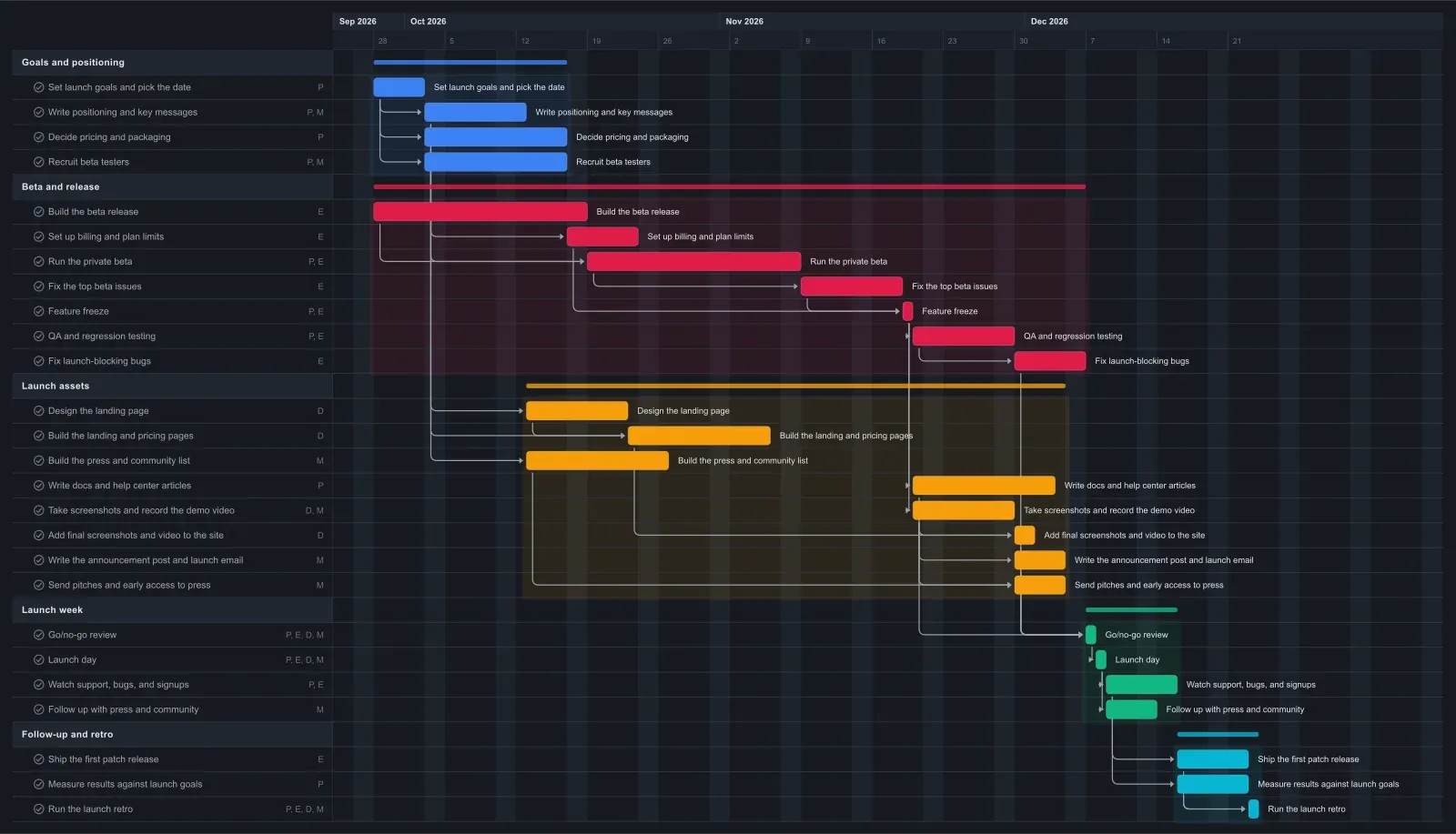
Product Launch Gantt chart template in EverGantt, dark theme

Frequently asked questions

How long does a product launch take?

A small team launching new software usually needs two to three months from launch goals to launch day. This template runs about 12 weeks, including two weeks of follow-up after launch. A feature launch to existing customers is usually shorter: delete the pricing and billing tasks, shorten the beta, then drag the later phases back to close the gap.

Why use a Gantt chart for a product launch?

A Gantt chart fits a product launch because the date is fixed and most of the work waits on other work. Screenshots wait on feature freeze, and launch day waits on QA. The chart links those tasks, so when one slips you see the new launch date right away, while there's still time to cut scope or move the date.

Do I need an account to use this product launch template?

No. The template opens in your browser with no account needed, and you can edit it and export a PNG, PDF, SVG, or CSV. Saving to the cloud and opening the plan from any browser starts at Pro, which is $3.99 a month for one person. See pricing for the details.

When should feature freeze happen before a launch?

In this template, feature freeze lands 19 days before launch day. That leaves ten days of QA, a week for launch-blocking bugs, and time for the screenshots, demo video, and docs to match the final product. For a bigger release, freeze earlier. After freeze, only bug fixes go in.

Can my whole launch team edit the plan together?

Yes, on a Team or Business plan, where you can invite others and edit the chart together live. Team covers up to 5 people and Business up to 20, each at one flat price. Pro saves the plan to the cloud for one person. To share status outside the team, export a PDF, which works on every plan.

Open the Product Launch template →

Related: Real-time vs. status-report project management · What is a sprint, and why can't we just use a Kanban board? · You're not short a tool, you're short a single source of truth

More templates