
EverGantt

Gantt chart template

Home Renovation Template

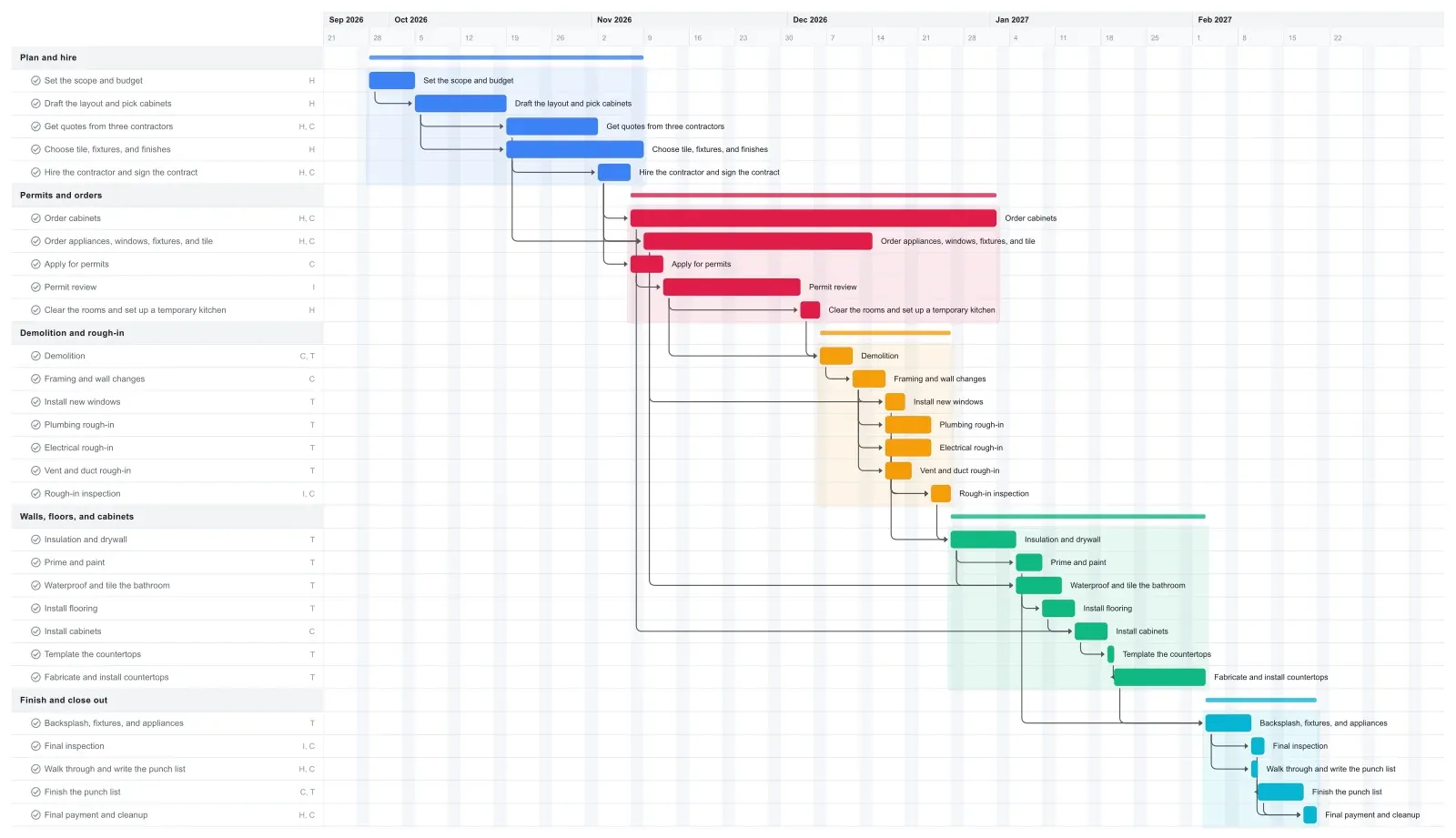
This home renovation Gantt chart plans a kitchen and bathroom remodel from first budget to final payment in about five months: design, contractor quotes, permits, long-lead orders, demolition, rough-in, inspections, cabinets, countertops, and the punch list. Every task is linked to the one it waits on, so when the plumber runs a week late, drywall, flooring, countertops, and your finish date all move with it. Open it in your browser with no account needed and set the dates from your contractor's quote.

29 tasks · 5 phases · about 5 months

Events & personal

Home Renovation Gantt chart template in EverGantt, light theme

What's in this template

PhaseTaskLengthDepends onWho
Plan and hire Set the scope and budget 7 days - Homeowner
Plan and hire Draft the layout and pick cabinets 2 weeks Set the scope and budget Homeowner
Plan and hire Get quotes from three contractors 2 weeks Draft the layout and pick cabinets Homeowner, Contractor
Plan and hire Choose tile, fixtures, and finishes 3 weeks Draft the layout and pick cabinets Homeowner
Plan and hire Hire the contractor and sign the contract 5 days Get quotes from three contractors Homeowner, Contractor
Permits and orders Order cabinets 8 weeks Hire the contractor and sign the contract Homeowner, Contractor
Permits and orders Order appliances, windows, fixtures, and tile 5 weeks Choose tile, fixtures, and finishes, Hire the contractor and sign the contract Homeowner, Contractor
Permits and orders Apply for permits 5 days Hire the contractor and sign the contract Contractor
Permits and orders Permit review 3 weeks Apply for permits Inspector
Permits and orders Clear the rooms and set up a temporary kitchen 3 days Permit review Homeowner
Demolition and rough-in Demolition 5 days Permit review, Clear the rooms and set up a temporary kitchen Contractor, Trades
Demolition and rough-in Framing and wall changes 5 days Demolition Contractor
Demolition and rough-in Install new windows 3 days Framing and wall changes, Order appliances, windows, fixtures, and tile Trades
Demolition and rough-in Plumbing rough-in 7 days Framing and wall changes Trades
Demolition and rough-in Electrical rough-in 7 days Framing and wall changes Trades
Demolition and rough-in Vent and duct rough-in 4 days Framing and wall changes Trades
Demolition and rough-in Rough-in inspection 3 days Plumbing rough-in, Electrical rough-in, Vent and duct rough-in Inspector, Contractor
Walls, floors, and cabinets Insulation and drywall 10 days Rough-in inspection, Install new windows Trades
Walls, floors, and cabinets Prime and paint 4 days Insulation and drywall Trades
Walls, floors, and cabinets Waterproof and tile the bathroom 7 days Insulation and drywall, Order appliances, windows, fixtures, and tile Trades
Walls, floors, and cabinets Install flooring 5 days Prime and paint Trades
Walls, floors, and cabinets Install cabinets 5 days Install flooring, Order cabinets Contractor
Walls, floors, and cabinets Template the countertops 1 day Install cabinets Trades
Walls, floors, and cabinets Fabricate and install countertops 2 weeks Template the countertops Trades
Finish and close out Backsplash, fixtures, and appliances 7 days Fabricate and install countertops, Waterproof and tile the bathroom Trades
Finish and close out Final inspection 2 days Backsplash, fixtures, and appliances Inspector, Contractor
Finish and close out Walk through and write the punch list 1 day Backsplash, fixtures, and appliances Homeowner, Contractor
Finish and close out Finish the punch list 7 days Walk through and write the punch list Contractor, Trades
Finish and close out Final payment and cleanup 2 days Final inspection, Finish the punch list Homeowner, Contractor

What a realistic home renovation timeline looks like

A kitchen and bathroom remodel usually takes four to six months from first plan to final payment, and a big share of that happens before anyone picks up a hammer. This template runs about five months: roughly ten weeks of planning, hiring, permits, and ordering, then about eleven weeks from demolition to final payment.

The early weeks set the schedule. Cabinets and windows can take weeks or months to arrive, and permit review can run from a couple of weeks to a few months depending on your city. So the plan orders long-lead items the week you sign the contract, while the permit is still under review.

Construction follows the order most remodels share: demolition, rough-in for plumbing, wiring, and ducts, an inspection before the walls close, then drywall, paint, flooring, cabinets, countertops, and fixtures. If your contractor works in a different order, drag the bars to match it.

Why one late trade or delivery moves the whole renovation

A renovation is a chain of handoffs, and most trades can't start until the one before them finishes. Drywall waits on the rough-in inspection, the countertop fabricator can't measure until the cabinets are in, and the plumber can't set the faucet until the countertops are down. When one link slips, everything after it slips too.

Every task in this template is linked to the one it waits on. If the plumbing rough-in runs a week long, the inspection, drywall, paint, flooring, cabinets, countertops, and final walkthrough all move a week, and you see the new finish date that day instead of at the end.

Some links have slack. The cabinet order lands about 12 days before the crew needs it, and the window order about nine days before late windows would hold up drywall, so a short shipping delay costs nothing. A three-week delay on either one moves your finish date. Knowing which orders have slack tells you which supplier to call first.

How to adapt this renovation template to your project

Delete the tasks your scope doesn't need, relink what's left, and drag later phases back to close gaps. For a bathroom-only remodel, delete the cabinet and countertop tasks; the fixtures task already waits on the bathroom tile. For a kitchen only, delete the bathroom tile task. If no windows change, delete the window install.

If your area doesn't require a permit for your scope, delete the permit and inspection tasks, then link drywall to the three rough-in tasks and clearing the rooms to the signed contract. Ask your building department first.

If your contractor won't start demolition until the cabinets arrive, link demolition to the cabinet order to see what that costs.

Hours are set only on a few of your own tasks. In weeks four and five, quotes and finishes overlap and fill the Homeowner role's 10-hour weekly cap. To paint it yourself, assign painting to the Homeowner role and add your hours. EverGantt marks any task in a week that goes over.

Make it yours

Drag the first task to your real start date and everything linked to it moves along. Rename the roles to your people, then export a PNG, PDF, or SVG when you need to share it. No template fits? Start from a blank plan with the project schedule maker. Saving to the cloud starts at Pro; sharing with teammates is on Team and Business.

Home Renovation Gantt chart template in EverGantt, dark theme

Frequently asked questions

How long does a home renovation take?

A kitchen and bathroom remodel usually takes four to six months from first plan to final payment, and this template runs about five. Design, contractor quotes, and permit review fill the first two months or more, while cabinets and windows are on order. A one-room refresh with no layout changes can take weeks instead of months.

Why use a Gantt chart for a home renovation?

A Gantt chart helps with a home renovation because almost every trade waits on another one. Flooring waits on paint, and the backsplash can't go up until the countertops are down. A Gantt chart links those tasks, so when one trade or delivery slips, you see the new finish date right away instead of finding out at the end.

Do I need an account to use this renovation template?

No. The template opens in your browser with no account needed, and you can edit it and export a PNG, PDF, SVG, or CSV. Saving to the cloud and opening the plan from any browser starts at Pro, which is $3.99 a month for one person. See pricing for the details.

Do I need a permit to remodel a kitchen or bathroom?

It depends on your city and your scope. Cosmetic work like paint or new cabinet doors often doesn't need one, while moving plumbing, adding circuits, or changing walls often does. Ask your local building department before you start. If you don't need one, delete the permit and inspection tasks and drag the later phases back to close the gap.

Can my contractor edit the schedule with me?

Yes, on a Team or Business plan, where you can invite others and edit the chart together live. Pro saves the plan to the cloud for you alone. If you only need to share where things stand, export a PDF and send it to your contractor, which works on every plan.

Open the Home Renovation template →

Related: A simple task tracker for personal projects · What a Gantt chart is actually for (and when you don't need one) · How to plan a project in your browser in 10 minutes

More templates