
A simple task tracker for personal projects
Published June 10, 2026
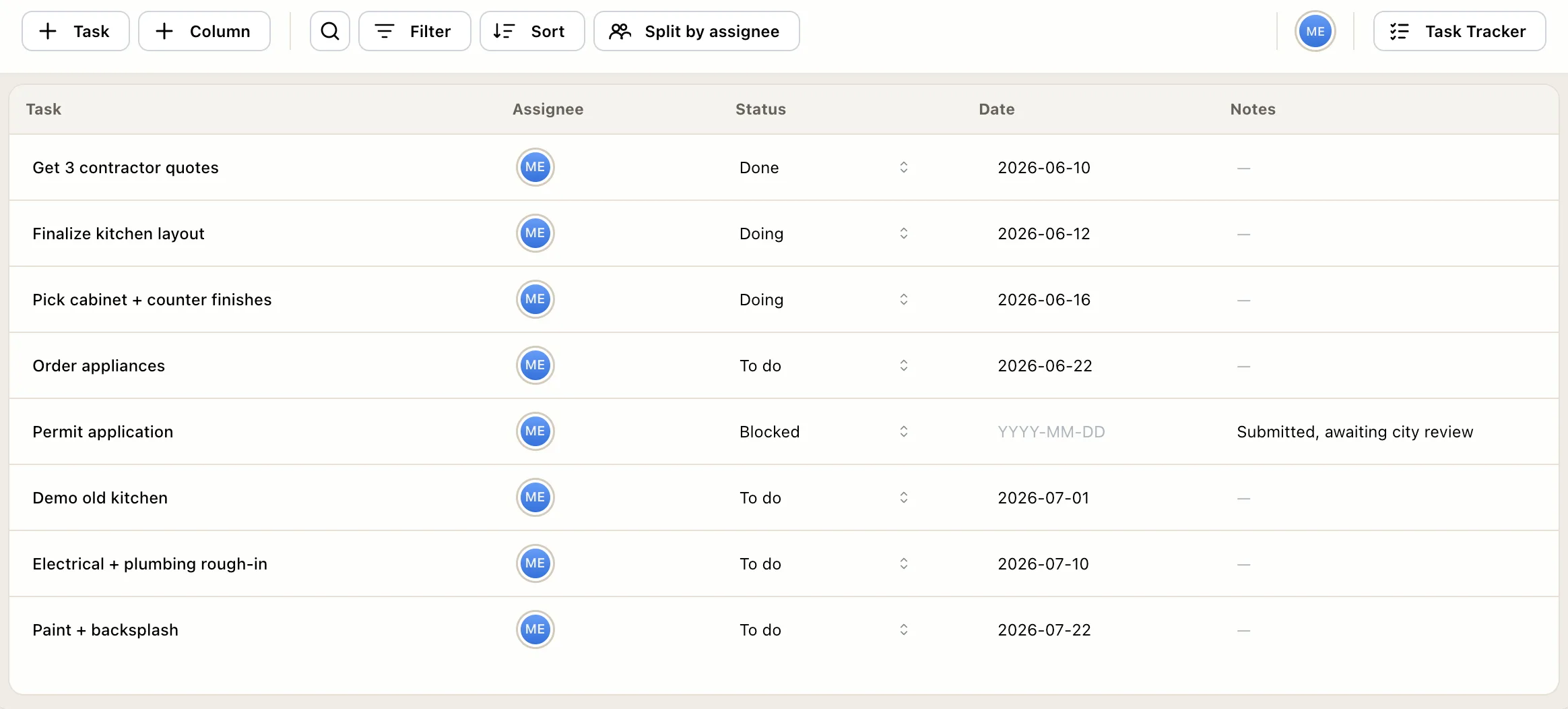
Somewhere between a sticky note and a Jira license, there’s a quiet gap: you have a real project, renovating a kitchen, planning a wedding, shipping a side app, and you just want to track the tasks. Not adopt a methodology, not configure a workspace, and definitely not watch a YouTube tour of someone’s Notion second brain. A list that tells you what’s next, and a place to cross things off.
This post is the short answer for that gap.
All you actually need is four fields
A personal project needs a flat table, one row per task:
- The task. Concrete enough that done is obvious. “Pick tile” beats “bathroom stuff.”
- A status. To do, doing, done. Three states. You are not a release pipeline.
- A date, when one exists. The permit deadline is real; most tasks just have an order.
- A note. The tile store’s phone number, the link, the measurement. The stuff you’d otherwise lose in a text thread with yourself.
That’s the whole schema. No priority matrix, no labels, no story points, no automations. Every field beyond these four is a tax you’ll pay on every update, and for a one-person project the entire system survives only as long as updating it feels free.
Why the heavyweight tools backfire here
Project management suites are built to solve coordination: many people, handoffs, dependencies, a deadline that cascades when something slips. Those are real problems, they’re just not your problems. A personal project has one person, who already knows what’s blocked, because she’s the one blocked.
So when you pour a 30-task personal project into a tool built for coordination, you get the overhead without the payoff: required fields you don’t care about, views you’ll never open, and a nagging sense that you’re behind on maintaining the tracker, which is a strange new task your project didn’t have before. The tool becomes a second project. That’s the moment most people quietly retreat to a notes app, and honestly, fair.
The fix isn’t more discipline. It’s a tool whose weight matches the work.
Keep it out of your work tool, too
The other tempting shortcut: you already have a project tool at work, so you tuck “renew passport” and the side project in there. Don’t. Mixing a laundry list into a work plan erodes the thing that makes a plan useful, trust that everything on it matters. Once your sprint board has “buy birthday gift” sitting next to a client deliverable, you start tuning the whole board out, and you stop trusting the tool to show what actually matters.
One personal tracker, one work plan. They can be the same kind of tool. They shouldn’t be the same list.
The fifteen-minute setup
- Make a project called the thing it is. “Kitchen reno.”
- Brain-dump every task you can think of, one row each. Don’t organize yet; just empty your head.
- Add dates only to tasks that truly have them. Drag the rest into rough order.
- Put the notes where the task is, the quote PDF link, the paint code, so future-you stops searching old messages.
- Once a week, five minutes: mark what moved, add what’s new, re-sort.
That’s it. The weekly pass is the entire methodology.
Where EverGantt fits
EverGantt has a task tracker mode that is precisely this flat table: tasks, status, date, notes, plus custom columns if (and only if) you want them. It’s free for individuals, runs in the browser with nothing to download, and there’s no workspace to configure, you’re tracking tasks within minutes of signing up.
And because the tracker, the Kanban board, and the timeline are views of the same project, your tracker can grow up later if the project does, the kitchen reno that turns into a whole-house remodel can become a board or a Gantt chart without re-entering anything. Until then, it stays a list, because a list is what the job needs.
Start free. Related: the easiest project management software · the 80% case · why teams fall back to spreadsheets.
Frequently asked questions
What is the best simple task tracker for personal projects?
The best tracker is a flat table with four fields, task, status, date, and a note, in a tool you'll actually keep open. EverGantt's task tracker mode is exactly that, free for individuals, in the browser with nothing to install. A spreadsheet works too; the fields matter more than the software.
Do I need project management software for personal projects?
No. Project management suites are built for coordination problems, many people, dependencies, deadlines that cascade. A personal project has one person and a list of things to do. A simple tracker covers it, and anything heavier tends to become a second project: maintaining the system.
Should I track personal tasks in my work project tool?
Keep them separate. Mixing errands and side-project tasks into a work plan buries real commitments under personal noise, and you stop trusting the tool to show what actually matters. One simple personal tracker and one work plan beats a merged pile of both.
How do I keep a personal task tracker up to date?
Keep the fields minimal so an update takes seconds, add tasks the moment you think of them, and do a five-minute weekly pass to mark progress and re-sort. If updating the tracker feels like a chore, it has too many fields, cut until it doesn't.